Mobile is connected to room wifi or academic area wifi, but there is no internet


Mobile is connected to room Wi-Fi or academic area Wi-Fi, but there is no internet. This issue can often be resolved by restarting the router or checking if there are any outages in the area. Additionally, verifying network settings on the mobile device may help restore the connection. 

Error Details below.


Disabling the private DNS on a mobile device will result in the restoration of internet connectivity.

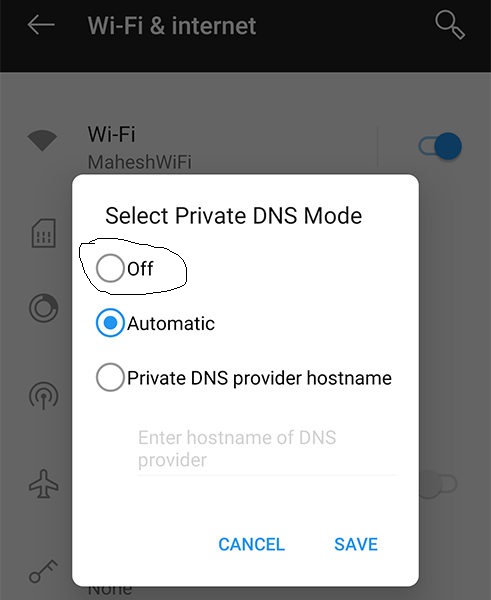

Please check these parameters also.

0 Comments

Suddenly the Wi-Fi is not working.

  Suddenly the Wi-Fi is not working. Please verify the following steps.  https://intranet.cb.amrita.edu/ or https://speedtest.cb.amrita.edu/ you able to access? Please attach both screenshots.https://speedtest.cb.amrita.edu/ (CLICK) For Example If you can access these sites, the problem is with the internet, not the intranet. Please send an email to sysadmin@cb.amrita.edu and also cc the following addresses: gopan@amrita.edu, kk_sunil@cb.amrita.edu, sree@amrita.edu, k_kamalesh@cb.amrita.edu, and campuswifi@cb.amrita.edu. Note- Recommend that you send the email for an official ‘amrita.edu’ domain so that we can address the issue.  This is to ensure that the email is genuinely originating from our student community.