Start -----RUN-----CMD----- start\\ftp\students$\Roll Number
OR
Start -----RUN-----\\ftp\students$\Roll Number
The user name is amritanet\roll number
The password is the Wi-Fi password or Lab computer login password
FTP server- Dedicated storage for the Ettimadai campus.
ICTS Department.
Ettimadai.
Mac-
Connecting to SMB shares with Mac OS X
Overview
This tutorial will walk you through connecting your Macs to SMB (Server Message Block) shares, hosted on Windows Servers, Windows Desktops, or network attached storage devices.
Mac OS X allows you to connect to different network shares using the Connect to Server utility. Although this tutorial covers SMB, it can be used for other protocols too.
Before you begin, make sure you have your NetID login account details before attempting to connect!
Launch Connect to Server
- From the Finder menu, click Go.
- Click Connect to Server from Go’s drop down menu.
- Alternatively, you can also press Command+K to launch Connect to Server.
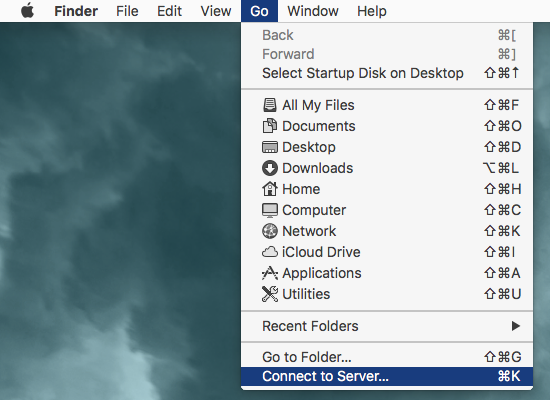
FIG 1 – OSX Finder – Connect to Server
Connect to a SMB Share
- In the Server Address field, enter smb:// to define the network protocol for SMB, and then enter either the IP address or the hostname of the server.
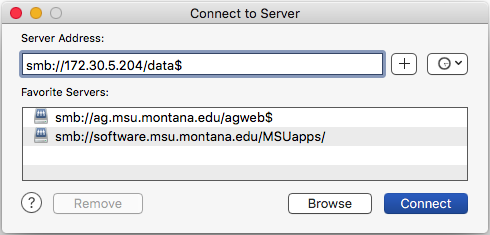
FIG 2 – Connect to Server dialog box - To add the server to your Favorite Servers list, click the ‘+’ button.
- Click Connect to connect to the share.
- When prompted, enter your NetID user name and password to connect to server.
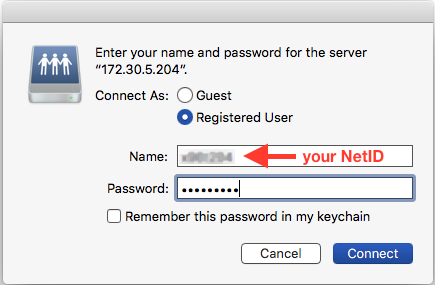
FIG 3 – User and password prompt amritanet\username - Click Connect to connect to the server.
- Violà! Once the connection is made, the share you have access to will appear on your desktop.
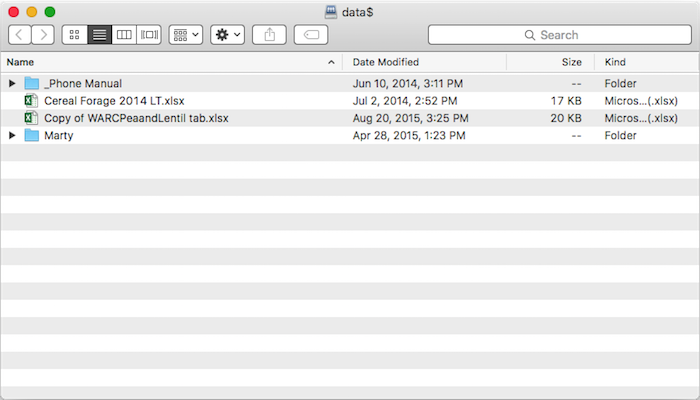
FIG 4 – Mounted share volume in OS X


0 Comments